
Cheque Printing Tool for Preparing Bank Cheques
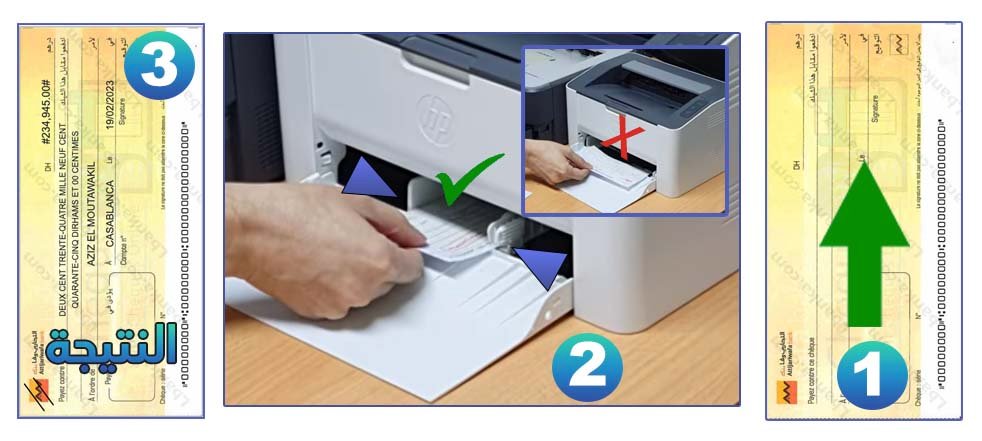
The Lbanka cheque printing tool helps you prepare a clean, readable and organized cheque layout before printing. Instead of writing every field manually, you can enter the main cheque information, verify the amount, adjust the beneficiary details and generate a printable format adapted to the selected bank layout.
This tool is designed for users who want to reduce manual writing errors when preparing a cheque, especially when the cheque includes a long beneficiary name, a precise amount, or a payment reference that needs to be clearly presented. It can also be useful for professionals, small businesses, associations and individuals who regularly prepare banking documents.
What is this cheque printing tool used for?
A cheque must usually include several important elements: the amount in numbers, the amount in words, the beneficiary name, the date, the place of issue and the signature of the account holder. A small inconsistency between the numeric amount and the written amount can create confusion during processing. The purpose of this tool is to help you prepare these elements in a structured way before printing.
The tool does not replace the official cheque provided by your bank. It helps you prepare the information and print it on the right cheque format when the layout is compatible with your bank’s cheque design.
When should you use it?
- When you need to prepare a cheque with a clean and professional layout.
- When the amount or beneficiary name is long and difficult to write manually.
- When you want to reduce the risk of mistakes before printing or signing.
- When you regularly prepare cheques for suppliers, rent, services or administrative payments.
- When you want to combine cheque preparation with other banking tools such as amount conversion or RIB verification.
Information you may need before printing
Before using the cheque printing tool, prepare the essential cheque details carefully. The accuracy of the final document depends on the information you enter.
- The exact amount to be paid.
- The amount written in words, especially if required on the cheque.
- The full name of the beneficiary or company.
- The date and place of issue.
- The bank or cheque layout you want to use.
- Any internal reference, invoice number or payment reason, if needed.
Practical tips before printing a cheque
Always review the cheque preview before printing. Make sure that the amount in numbers matches the amount in words, the beneficiary name is complete, and the date is correct. If you are printing on an official cheque sheet, test the alignment first on a blank paper to avoid wasting a cheque.
After printing, verify that all fields are clearly positioned and readable. Do not sign the cheque before checking the information. If the printed layout is not aligned with your bank’s cheque, adjust the settings or contact your bank to confirm the accepted format.
Frequently asked questions
Can I use this tool for all banks?
The tool helps you prepare cheque information in a printable layout, but cheque designs can vary by bank. Always verify the alignment and requirements of your own bank before using the printed cheque.
Does this tool replace an official bank cheque?
No. The tool does not create an official cheque by itself. It helps you prepare and print information on a compatible cheque format or document layout.
Why is the amount in words important?
The amount in words helps avoid ambiguity. If the numeric amount and written amount are different, the cheque may be questioned or refused. You can use the amount-to-words converter on Lbanka before printing.
Should I sign the cheque before or after printing?
It is better to print and review the cheque first, then sign it only after confirming that all information is correct and clearly placed.